Pixel Streaming Behind a Firewall: Ports and Domains to Allow
Pixel streaming behind a firewall? Here are the exact domains, ports and proxy rules your network team needs to allow for Eagle 3D Streaming.
 Rafshan Tashin
November 13, 2026
4 min read
Running pixel streaming behind a firewall is where many enterprise rollouts stall. The app works perfectly on your laptop, then a client opens the link on their office network and sees a black frame. Almost always, the network blocked one specific piece of traffic.
Why corporate networks break the stream
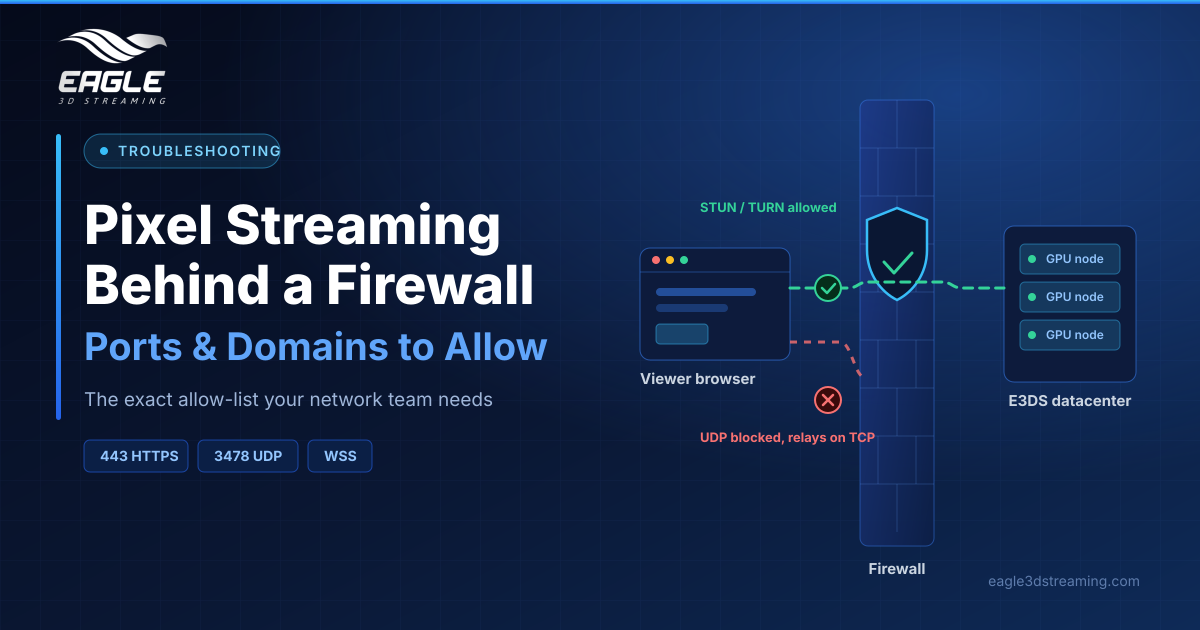
Pixel streaming rides on WebRTC, which needs a direct media path between the viewer's browser and the GPU machine. ICE uses STUN and TURN servers to establish that path. STUN discovers your public address and any router restrictions that would block a direct peer connection, while TURN works around strict NAT by relaying the traffic through a server. Block those, and the handshake never finishes.
Domains to allow for the Control Panel
Developers need these on 443 (HTTPS): controlpanel.eagle3dstreaming.com for the pages, agw.eagle3dstreaming.com for the projects and builds API, auth-restful.eagle3dstreaming.com for sign-in, Google's identitytoolkit.googleapis.com and securetoken.googleapis.com for authentication, and firestore.googleapis.com for live upload progress.
Domains to allow for uploads
Builds travel straight from the browser to *.r2.cloudflarestorage.com over 443, using the PUT and OPTIONS methods. Uploads from a Dropbox or Google Drive link also check streamtest.eaglepixelstreaming.com.
One proxy rule matters here. Traffic to that storage domain must pass through untouched, including the browser's OPTIONS preflight. If the proxy answers that request itself, the browser reports a CORS error and the upload fails.
Domains and ports to allow for viewers
Viewers need less, but every item counts:
*.eagle3dstreaming.comon 443 HTTPS and WebSocket (WSS), for the stream page and setup connectionglobal.turn.twilio.comon 443 TCP and 3478 UDP/TCP, the video relay used automatically when direct UDP failsglobal.stun.twilio.comon 3478 UDP, which finds the direct path
Analytics domains are optional, so skip them if your policy is strict. (Network requirements)
How to narrow down the fault
Test in this order. First, check whether the Control Panel loads at all, which separates sign-in problems from streaming problems. Next, confirm the stream reaches the setup stage before failing. Then verify UDP 3478 is open outbound, because blocked UDP forces every session onto the TCP relay and adds latency.
Our guide to the pixel streaming connection speed test shows how to read live connection state during a session. If sessions connect and then drop, read why your session stopped mid-stream instead.
Send IT one request, not five
Network teams respond faster to a single complete list. Include the domains above, the two ports, the proxy note about preflight requests, and the business reason. Meanwhile, you can test from a mobile hotspot to prove the build itself is fine.
For deployments inside your own cloud, see scalable cloud infrastructure and our DevOps solutions page.
FAQs
Does pixel streaming behind a firewall need inbound ports open?
No. Viewers only make outbound connections, so inbound rules stay closed. (Network requirements)
What happens if UDP is blocked entirely?
The session falls back to the TURN relay on 443 TCP automatically. Expect slightly higher latency.
Why does my upload fail with a CORS error?
A proxy answered the browser's preflight request instead of passing it through.
Can I avoid public STUN and TURN servers?
Enterprise deployments can run in your own cloud region. Contact support to scope it. (Capacity and regions)
Conclusion
Getting pixel streaming behind a firewall to work is a checklist job, not a mystery. Allow the Control Panel and upload domains, open 443 and UDP 3478 for streaming, and keep preflight requests unmodified.
Stuck on a locked-down network? Book a demo meeting and we'll walk your IT team through it.
Need help? support@eagle3dstreaming.com · Discord