Pixel Streaming Load Time: Why It Is Slow and How to Cut It
Pixel streaming load time depends on four start-up stages. See typical waits, what makes them longer, and the fixes that shorten them the most.
 Rafshan Tashin
November 13, 2026
4 min read
Pixel streaming load time is the first thing a client judges. They click your link, watch a progress bar, and decide whether this feels polished or broken. Understanding what happens during that wait tells you exactly where to spend your optimization effort.
What a typical wait looks like
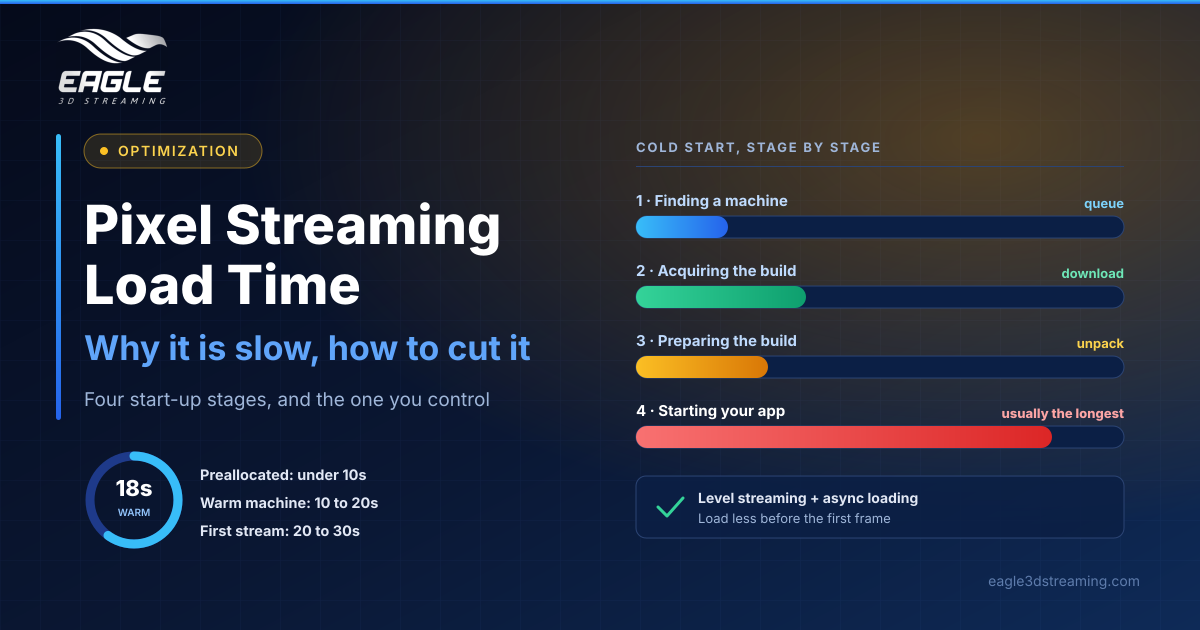
Eagle's documentation gives rough ranges rather than guarantees. A preallocated app that is already running starts in under 10 seconds. An app streamed often, warm on E3DS machines, takes 10 to 20 seconds. An app streamed for the first time takes 20 to 30 seconds.
A warm machine already holds your unpacked build, and uploading a new version makes every machine cold again. Plan demos accordingly: never upload a fresh build an hour before a client call.
The four stages of a cold start
The wait breaks into four parts. First the platform finds a machine, possibly from a queue. Next it acquires your build, downloading it to that machine, which viewers see as the acquiring percentage. Then it prepares the build by unpacking it. Finally your app starts, and for substantial apps this is usually the largest part.
That last point reframes the whole problem. The platform's share is roughly fixed, so your app is the variable: how much content it holds, how it is structured, and how much must exist before the first frame. Native load time is the floor, because streaming can add to it but never subtract from it.
Fix the app first
Load less before the first frame. Start in a small map and bring the rest in afterwards. Unreal supports this directly: level streaming loads and unloads map files from memory and toggles their visibility during play.
Load in the background next. Asynchronous loading keeps the app usable while remaining assets arrive, and Unreal's project settings include an async loading thread for package streaming.
For broader wins, work through our complete guide to performance optimization for pixel streaming.
Remove the platform's share with preallocation
Preallocated apps keep one of your applications running continuously on your own machine through E3DS Stream Host, so viewers connect to an app that has already started and wait only for the connection.
The trade-off is real. You pay for a machine that runs whether or not anyone watches, the GPU and CPU stay under continuous load, and an app left preallocated after an event keeps costing the same. It suits live demos, event first impressions and frequently used public experiences, not occasional or bursty traffic.
One capacity note matters too: a preallocated app occupies one CCU for as long as you hold it, even when nobody is streaming. Our guide to self-hosted streaming with E3DS Stream Host covers the setup.
Make the wait feel shorter
A branded loading screen beats a blank frame, even though it changes nothing technically. See how to customize your iframe loading experience.
Measure before you optimize
Time each stage separately by watching the loading overlay, which shows you which part is actually slow. Region choice can also play a part, as explained in how E3DS picks a region.
FAQs
Why is the first stream of a new build always slower?
A new upload makes every machine cold, so the build must download and unpack again.
Which stage is usually the longest?
Your app starting, for most substantial projects.
Can pixel streaming load faster than the app does locally?
No. Native load time is the floor.
Is preallocation worth the cost?
Only when the machine is rarely idle. (Preallocated apps)
Conclusion
Pixel streaming load time splits into a fixed platform share and a variable app share, and the app share is where your gains live. Cut what loads before the first frame, load the rest asynchronously, and reach for preallocation when a few seconds genuinely matter.
Want a second opinion on your build? Talk to a specialist about your load times.
Need help? support@eagle3dstreaming.com · Discord