Automate Unreal Build Uploads with the E3DS REST API
Automate Unreal build uploads from your pipeline: the four REST API calls, resumable part uploads, the automatic stream test and key safety.
 Rafshan Tashin
November 20, 2026
5 min read
Teams that automate Unreal build uploads stop losing afternoons to the upload-and-check routine. Package, push, and let the pipeline upload the build and run the stream test while you do something else. Eagle exposes this as a REST API, with ready-made scripts on top of it. (Upload with the REST API)
The four calls
Everything runs against https://agw.eagle3dstreaming.com, with Authorization: Bearer YOUR_API_KEY on every request except the part uploads:
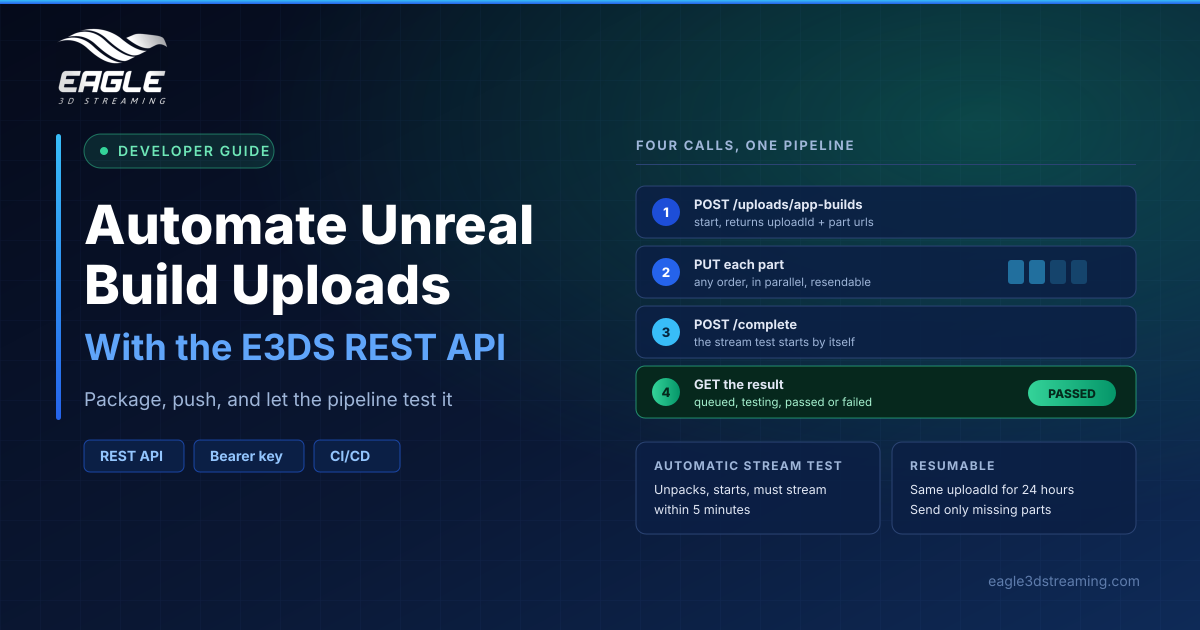
| Step | Call | Purpose |
|---|---|---|
| 1 | POST /v1/uploads/app-builds | Start the upload, returns 201 |
| 2 | PUT <part url> | Send each part's bytes, no key needed |
| 3 | POST /v1/uploads/app-builds/{uploadId}/complete | Finish; the stream test starts itself |
| 4 | GET /v1/uploads/app-builds/{uploadId} | Read the test state and result |
Step 1 needs app, fileName and fileSize in bytes. It returns an uploadId, the assigned version, the partSize the server chose, and the part addresses.
Why the part structure helps
Builds are large, so uploads get cut into parts. Part n starts at byte (n − 1) × partSize, parts may be sent in any order and in parallel, and a failed part can be resent on its own rather than restarting the whole upload.
Defaults scale with file size: 10 MB parts under 1 GB, 50 MB under 10 GB, and 100 MB above that, with a ceiling of 10,000 parts. The official tools send 4 parts in parallel by default.
Resumption is built in. Starting again with the same app, file name and size within 24 hours returns the same uploadId, and you send only the parts missing from doneParts. If your uploads are slow before you automate anything, our guide to checking and fixing upload speed is worth a read first.
The stream test is the real win
Completing an upload does more than store a file. The server unpacks the build on a test machine, starts it, and requires it to stream within five minutes. Then it reports back:
queued: waiting for a test machinetesting: test runningpassed: ready, withliveshowing whether it is the streaming versionfailed:reasonexplains why, andreportlinks to the full stream test reportreplaced: a newer upload superseded it before testing
Poll every 30 seconds; tests usually take three to eight minutes. A failing test most often means the Pixel Streaming plugin is missing from the build. Note that this endpoint accepts Windows builds only, and refuses Linux ones.
Guard the key
Three key types exist, and mixing them up is the common mistake:
- API key: one per account, full account power including deleting or replacing apps. Server-side only.
- Streaming API key: used in Web SDK integrations to create session tokens, and cannot delete or replace apps.
- Session token: single use, authorises one session, and expires if unused.
Never put the plain API key in a browser; that use is being withdrawn, and existing integrations should move to the Streaming API key. Rotating matters too: generating a new API key invalidates the old one immediately, so update every script before you rotate. (API keys and tokens)
While you are in the Developer section, check the Version Control switch. With it on, each upload adds a version and old ones stay available. With it off, uploads overwrite the previous build permanently, which makes a version rollback impossible.
Pick the right tool
Raw calls suit a custom uploader. Most teams should use what already exists: E3DS CI/CD for Node.js, the Python and PowerShell upload scripts, the E3DS CLI, or the CI/CD plugin for Unreal. See the CI/CD upload automation feature page and our DevOps solutions page.
FAQs
What do I need to automate unreal build uploads?
An API key, a packaged Windows .zip, and the app name to upload it under. (Upload with the REST API)
Can I resume an interrupted upload?
Yes, within 24 hours, by restarting with the same app, file name and size and sending only the missing parts.
What happens when the stream test fails?
The state returns failed, with reason explaining why and report linking to the full stream test report.
Can I upload Linux builds this way?
No. The complete endpoint accepts Windows builds only.
How long does the stream test take?
Usually three to eight minutes. Poll the upload every 30 seconds.
Conclusion
Four calls automate the whole upload, and the stream test turns your pipeline into a safety net rather than just a conveyor belt. Start with the maintained scripts, keep the API key server-side, and leave Version Control on so a bad build is always one rollback away.
Want this running in your pipeline? Talk to a specialist or start a free trial.
Need help? support@eagle3dstreaming.com · Discord