Pixel Streaming File Transfer: Send and Receive Files With the E3DS Features Plugin
Pixel Streaming file transfer lets viewers download files from your app and upload files to it. See the nodes, JSON commands, messages and limits.
 Rafshan Tashin
October 23, 2026
8 min read
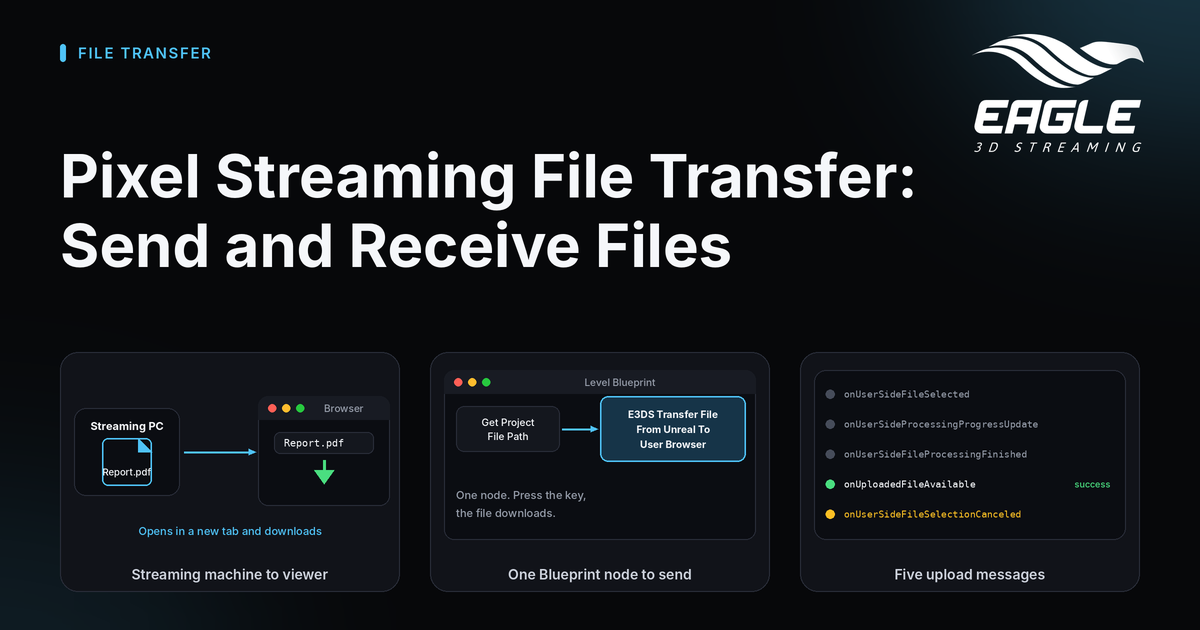
Pixel Streaming file transfer moves files in both directions between your streamed Unreal app and the person watching it. Your app can hand the viewer a generated PDF, an exported model or a screenshot. The viewer can also pick a file in their browser and drop it onto the streaming machine, where your app reads it like any other file (source).
This post shows both directions, the Blueprint nodes and JSON commands behind them, and the pitfalls that catch most teams the first time.
How Pixel Streaming File Transfer Works
The viewer's browser and your app run on different computers. Your app runs on the streaming machine, and the viewer sits in front of a phone or laptop. A file therefore has to cross that gap on purpose (source).
- Send: the streaming machine sends a file, and the viewer's browser downloads it.
- Receive: the viewer picks a file in the browser's file picker, and the platform writes it to the streaming machine. Your app then reads it as an ordinary file.
Both directions use the E3DS Features plugin from Fab or GitHub. Install it, then add BP_E3DS_PS_Actor to your level (send guide, plugin setup). You can also work without the plugin by sending JSON commands, which this post covers too. For a wider tour of what the plugin adds, read why UE developers need the Eagle 3D Features plugin.
Send a File to the Viewer's Device
Start with the plugin route, because it needs the fewest nodes (source):
- Place
BP_E3DS_PS_Actorin the level. - In the Level Blueprint, add a trigger. The docs demo uses the H key.
- Add a Get Project File Path node with the path to your file.
- Connect it to E3DS Transfer File From Unreal To User Browser.
- Compile and save.
Press the key with the viewport focused, and the file opens in a new browser tab, which downloads it. If nothing happens, check the path first. The file must exist on the streaming machine, not on your own computer. A missing file produces the error EL Error:file does not exist: followed by the path.
Download now or get a download link
Without the plugin, you send JSON with Send Pixel Streaming Response. Two commands exist, and they behave differently (source).
downloadLocalFileOnUserDevice | getDownloadUrlOfLocalFile | |
|---|---|---|
| What the viewer sees | A new browser tab opens and the file downloads | Nothing opens |
| What your app receives | Nothing extra | A takeDownloadUrlOfLocalFile message with a downloadURL |
| Best for | A report the viewer asked for | A custom button, a QR code or your own download screen |
| Same as the plugin node | Yes | No, this one is JSON only |
Both commands take the full file path in fileToDownload. With the link command, your app decides what to do with the URL, such as showing it as text or turning it into a button.
Receive a File From the Viewer's Device
To let a viewer upload a file, call E3DS Transfer File From User Browser To Unreal and give it a destination inside the project, such as ProjectDirectory/Saved/. The platform opens a file dialog for the viewer. Your app then watches for messages to learn what happened (source).
| Message | What it means |
|---|---|
onUserSideFileSelected | The viewer chose a file and the transfer started |
onUserSideProcessingProgressUpdate | Repeats while sending, with filename and progress |
onUserSideFileProcessingFinished | The browser has finished sending |
onUploadedFileAvailable | The file is on the streaming machine, which is your success signal |
onUserSideFileSelectionCanceled | The viewer closed the dialog without choosing a file |
Track three states: in progress, finished and abandoned. A common pattern uses a timer that calls File Exists until it returns true. Handle onUserSideFileSelectionCanceled too. Otherwise, your timer waits forever after a viewer closes the dialog.
The progress value is not a usable percentage today. Treat it as a sign of activity, not as a progress bar.
Without the plugin, send {"cmd": "sendLocalFileToUE4", "pathToSaveFile": "<absolute path ending in />"}. The trailing slash matters, because the file name is appended with no separator (source).
Build File Paths That Work on Every Streaming Machine
Never hard-code a path. A path that works on your computer fails on the streaming machine, and it differs from one streaming machine to the next. Build it at run time instead.
For sending, chain Get Project Saved Directory, then Convert Relative Path To Full, then append the file name. The conversion step is required, because packaged apps return a relative path such as ../../../YourApp/Saved/, and the streaming machine cannot resolve that (source).
For receiving, use Get Project Directory or Get Project Saved Directory, convert it to a full path and add the trailing /. The destination must sit inside the project directory. Absolute paths such as C:\ and folders outside the project are not supported (source).
Limits and Pitfalls of Pixel Streaming File Transfer
Plan around these points before you ship:
- Sent files travel through public storage. Anyone with the link can fetch the file, so do not send private content this way.
- A pop-up blocker can stop the new tab from opening on the viewer's side.
- Virus scanning runs after the file is written. A flagged file is deleted, but
onUploadedFileAvailablemay already have fired. Check with File Exists before you use the file. - A failed transfer sends no failure message. If
onUploadedFileAvailabledoes not arrive within a time that suits your file sizes, treat the transfer as failed. The docs do not name that time. - The docs state no maximum file size. Test with the largest file your viewers will realistically use.
Several related tasks use the same plugin, including capturing a screenshot and opening and redirecting URLs. If you embed your stream on your own page, see iframe vs Web SDK to choose how your page talks to the app.
Conclusion: Add Pixel Streaming File Transfer to Your App
Pixel Streaming file transfer takes one node in each direction. Send a file with E3DS Transfer File From Unreal To User Browser, or ask for a download link when you want your own interface. Receive a file with E3DS Transfer File From User Browser To Unreal, and listen for onUploadedFileAvailable before you trust the result. Build every path at run time, and keep private content out of sent files.
Ready to try it? Create a free account, install the Features plugin, and test the H key demo from the steps above. If you want a second opinion on your setup, reach out through any channel below, or explore the Features plugin and the API reference guide.
Need help?
If you need any assistance, feel free to reach out through any of the following channels:
🛠️ Support Portal: Contact Our Support Team
💬 Discord Community (Faster Support): Join Our Discord Community
📧 Email Support: support@eagle3dstreaming.com
Follow us on:
Facebook | GitHub | LinkedIn | YouTube
FAQ
How do I send a file from my Unreal app to the viewer?
Place BP_E3DS_PS_Actor in your level, then connect a Get Project File Path node to E3DS Transfer File From Unreal To User Browser. The file opens in a new browser tab, which downloads it (source).
How can a viewer upload a file to my streamed app?
Call E3DS Transfer File From User Browser To Unreal with a destination inside your project, such as ProjectDirectory/Saved/. The platform opens a file dialog for the viewer, and your app receives onUploadedFileAvailable when the file arrives (source).
Can I do Pixel Streaming file transfer without the Features plugin?
Yes. Send JSON through Send Pixel Streaming Response: downloadLocalFileOnUserDevice or getDownloadUrlOfLocalFile to send, and sendLocalFileToUE4 to receive (send guide, receive guide).
Is it safe to send private files to a viewer?
No. The file travels through public storage, and anyone with the link can fetch it. Keep private content out of this route (source).
Why does my file path fail on the streaming machine?
The path probably came from your own computer, or it is relative. Build it at run time with Convert Relative Path To Full, because packaged apps return paths such as ../../../YourApp/Saved/ that the streaming machine cannot resolve (source).
What if a received file goes missing after the success message?
The virus scan runs after the file is written, and it deletes flagged files. onUploadedFileAvailable may already have fired, so check with File Exists before you use the file (source).
Share this article