NVIDIA Omniverse Streaming: Stream an Omniverse Kit App to Any Browser
NVIDIA Omniverse streaming on Eagle 3D Streaming: stream an Omniverse Kit app to any browser with no static IP. Free during beta. See what your app needs.
 MD Rafshan Tashin Eshan
October 16, 2026
6 min read
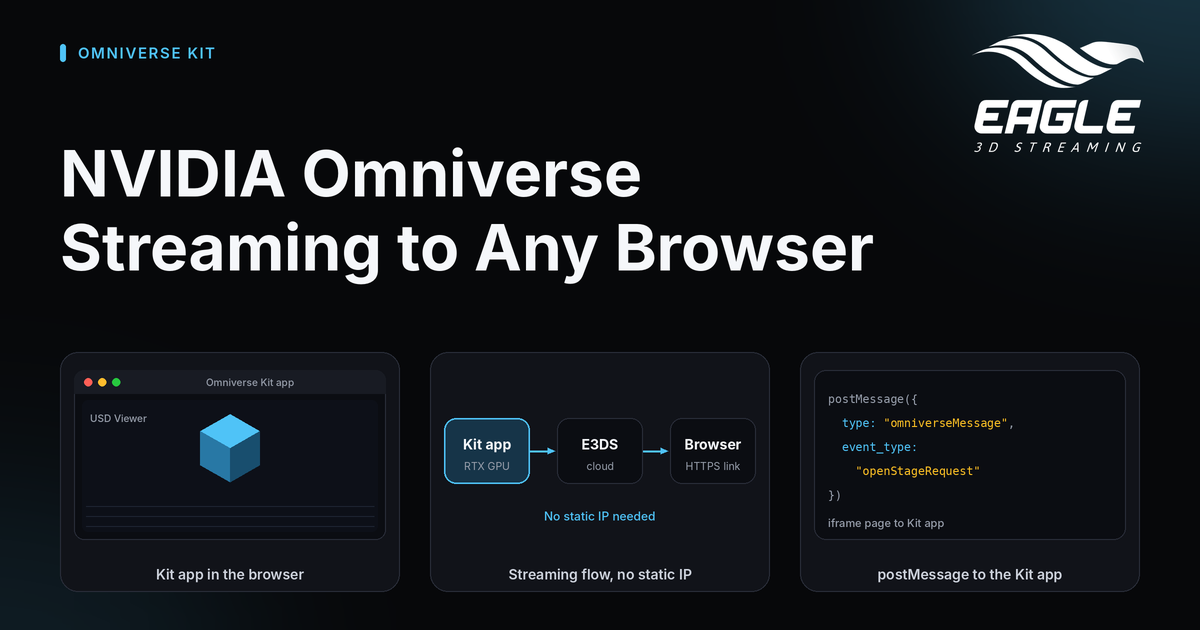
NVIDIA Omniverse streaming on Eagle 3D Streaming lets viewers see and control an Omniverse Kit app in a web page. The Kit app runs on an Eagle 3D Streaming GPU machine, and the viewer needs no static IP, no server and no install. Omniverse streaming is in beta and free while it stays in beta (NVIDIA Omniverse streaming).
This guide covers what your app needs, how to get a link, and how to talk to the app from your own page.
How NVIDIA Omniverse Streaming Works on Eagle 3D Streaming
Kit's streaming normally expects the browser to reach the GPU machine directly. With Eagle 3D Streaming, the viewer opens an ordinary HTTPS link, and the connection to the app is set up through Eagle 3D Streaming's servers. Your machine needs neither a static IP nor a public address, which makes Omniverse without a static IP practical (source).
Viewers do not need NVIDIA software or an RTX GPU either. The app renders on the Eagle 3D Streaming machine, and the viewer only decodes a video in the browser.
You can find other app types on the Stream any app in the browser page.
What Your Omniverse Kit App Needs
Your Kit app must meet three requirements (source).
| Requirement | What it means |
|---|---|
| Kit's WebRTC streaming extension | An app built from NVIDIA's kit-app-template has a streaming variant of its .kit file that adds omni.kit.livestream.webrtc. Stream that one. |
| A self-contained package | Package with the template's own command, repo.bat package. The ZIP runs on a machine without the Kit SDK or NVIDIA's caches. The folder under _build is not enough on its own. |
| Windows and an NVIDIA RTX GPU | Eagle 3D Streaming's machines provide both. |
The team verified the setup with Kit 107.3 and the template's USD Viewer app. Other Kit versions should work the same way but are untried, so mention your version when you get in touch.
The exe that Eagle 3D Streaming starts
Eagle 3D Streaming starts the exe at the top of the ZIP that has exactly the app's name. If you upload the app as MyKitApp, the exe is MyKitApp.exe. For a Kit app, that exe is a small launcher the team adds, which starts kit\kit.exe with the streaming .kit file. You cannot simply rename kit.exe, because Kit picks the .kit file from the exe's name.
If no exe at the top matches the app's name, Eagle 3D Streaming looks for an Unreal exe, finds none, and the app does not start. When the app name changes, the launcher's name changes with it.
How to Stream an Omniverse Kit App to a Browser
You do not upload a Kit app on your own yet. Email support@eagle3dstreaming.com, and Eagle 3D Streaming takes your packaged app, sets up its launch and sends back a streaming link (source).
Prepare these items before you write:
- Build your app from
kit-app-template, or confirm it includes the WebRTC streaming extension. - Package it with
repo.bat packageand keep the resulting ZIP. - Decide the app name, since the launcher exe must match it.
- Note your Kit version.
Streaming is free during the beta. To get a feel for the platform first, try the demo apps.
Two Ways to Show the Stream: Eagle Player or the Omniverse Web Viewer
You can present the stream in two ways (source).
| Eagle 3D Streaming player | NVIDIA's Omniverse web viewer page | |
|---|---|---|
| Look | The same full-window player as every Eagle 3D Streaming app, with a settings button | NVIDIA's sample page with its own panel |
| Viewer input | Mouse, wheel and keyboard. A touch acts as the left mouse button | NVIDIA's own input handling |
| Talk to the app from your website | Yes, through the iframe | Through NVIDIA's page only |
Pick the Eagle player when you want your own web page to control the app. Pick NVIDIA's page when its panel already does what you need.
Talk to Your Kit App From Your Own Web Page
A Kit app can define its own messages. The USD Viewer template, for example, answers openStageRequest by opening a file and getChildrenRequest by listing the scene. When the Eagle player sits in an <iframe> on your page, your page sends messages to the player, and the player passes them to the app (source).
// your page -> the Kit app
iframe.contentWindow.postMessage(JSON.stringify({
  type: "omniverseMessage",
  event_type: "openStageRequest",
  payload: { url: "${omni.usd_viewer.samples}/samples_data/stage02.usd" }
}), "*");

// the Kit app -> your page
window.addEventListener("message", (e) => {
  const m = JSON.parse(e.data);
  if (m.type === "omniverseReady") { /* the app can now receive messages */ }
  if (m.type === "omniverseEvent") { console.log(m.event_type, m.payload); }
});
Your Kit app's own extension decides which event_type names exist and what each payload holds. Eagle 3D Streaming does not. The team confirmed that choosing a file, listing the scene, selecting objects and resetting the stage all work this way with the USD Viewer template, exactly as in NVIDIA's own viewer.
For iframe basics, see Embed with an iframe.
Conclusion: Start NVIDIA Omniverse Streaming in the Beta
NVIDIA Omniverse streaming removes the static IP, the server and the viewer install. You bring a self-contained Kit package with WebRTC streaming, and Eagle 3D Streaming brings the GPU machine, the link and the player. Add the iframe messages when you want your own page to drive the app.
Have a Kit app ready to share? Email our team with your package and Kit version to join the free beta. If you have questions first, use any channel below. You can also see how Eagle 3D Streaming works or check the system requirements for developers and viewers.
Need help?
If you need any assistance, feel free to reach out through any of the following channels:
🛠️ Support Portal: Contact Our Support Team
💬 Discord Community (Faster Support): Join Our Discord Community
📧 Email Support: support@eagle3dstreaming.com
Follow us on:
Facebook | GitHub | LinkedIn | YouTube
FAQ
Can NVIDIA Omniverse apps be streamed to a browser without a static IP?
Yes. The viewer opens an ordinary HTTPS link, and the connection to the app runs through Eagle 3D Streaming's servers. The machine needs no static IP or public address (source).
Do viewers need NVIDIA software or an RTX GPU?
No. The app renders on Eagle 3D Streaming's GPU machine, and the viewer only decodes a video in the browser (source).
Which Omniverse apps can I stream?
Kit apps that include Kit's WebRTC streaming extension and ship as a self-contained ZIP, such as apps made from NVIDIA's kit-app-template (source).
What does Omniverse streaming cost?
Nothing during the beta. Email support to join (source).
Which Kit version works?
The team verified Kit 107.3 with the USD Viewer template. Other versions should behave the same but are untried, so share your version when you contact support (source).
Why did my Kit app stop starting after I renamed it?
Eagle 3D Streaming starts the exe at the top of the ZIP that carries the app's exact name. After a rename, the launcher exe must take the new name too (source).
Share this article