Pixel Streaming vs Pixel Streaming 2 in Unreal Engine 5 — The Beginner Guide
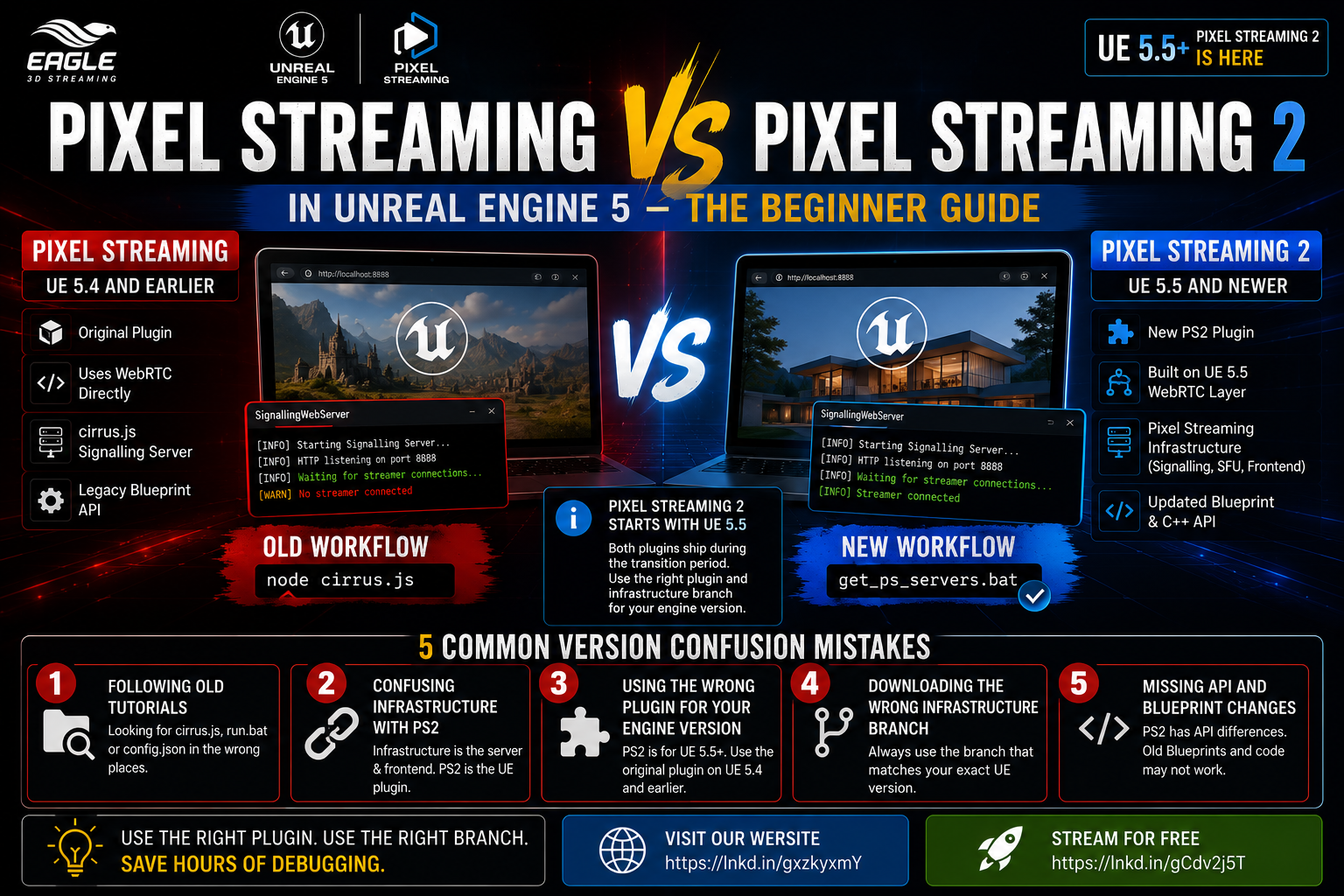
Confused by Pixel Streaming vs Pixel Streaming 2 in UE5? This guide explains the difference between the plugins, the infrastructure, and how to avoid the 5 most common version confusion mistakes.
 MD Rafshan Tashin Eshan
May 20, 2026
11 min read
If your Pixel Streaming setup does not look like the tutorial you are following, your project may not be broken. You may simply be mixing instructions for the original Pixel Streaming plugin with instructions for Pixel Streaming 2.
This is one of the most common sources of confusion in UE5 Pixel Streaming setups — and it wastes hours of debugging time on a problem that isn't actually a problem. This guide explains exactly what the difference is, when each plugin applies, and the five version confusion mistakes that trip up beginners most often. Eagle 3d Streaming is one of the few platforms that support PS2.
The Most Important Thing to Get Right First
Pixel Streaming 2 starts with Unreal Engine 5.5.
Epic introduced Pixel Streaming 2 as a new plugin from UE5.5 onward. During the migration period, both the original Pixel Streaming plugin and the new Pixel Streaming 2 plugin are shipped with Unreal Engine so developers have time to move over.
That means if you are on UE5.2 or UE5.3, you are not using Pixel Streaming 2 by default. That is the most common version mistake beginners make.
Three Things People Regularly Confuse
Before the five mistakes, it is worth being precise about what these terms actually mean — because many tutorials use them interchangeably when they should not.
Pixel Streaming plugin — the original plugin. Used in UE5.4 and earlier.
Pixel Streaming 2 plugin — the newer plugin introduced from UE5.5 onward. A new plugin built around UE5.5's new internal WebRTC layer.
Pixel Streaming Infrastructure — a separate repository that provides the server and frontend side: signalling server, SFU, frontend libraries, matchmaker-related pieces, and scripts. This is not the same thing as the Pixel Streaming 2 plugin.
When someone says "Pixel Streaming 2," check what they actually mean:
- Do they mean the UE plugin?
- Do they mean the signalling server scripts?
- Do they mean the frontend library?
- Do they mean an old tutorial that still references
cirrus.js?
Those are related, but they are not the same thing.
What Changed in Pixel Streaming 2?
Pixel Streaming 2 exists because UE5.5 introduced a new internal WebRTC layer. The original Pixel Streaming plugin used WebRTC directly, so Epic created a new plugin to make the transition cleaner.
Pixel Streaming 2 is not just a renamed folder. It is a new plugin with real migration differences. Epic's migration guide says the basic getting-started flow and launch arguments were kept as similar as possible — but there are Blueprint, C++ API, and functionality changes. WebRTC types are no longer exposed in the same way through the new plugin.
Version rule:
| Engine Version | Which Plugin |
|---|---|
| UE5.4 or earlier | Use the original Pixel Streaming plugin workflow |
| UE5.5 and newer | Pixel Streaming 2 is available as a built-in plugin |
| UE5.5 and newer | Both the original plugin and Pixel Streaming 2 are shipped during the transition period |
| Any UE version | Use the Pixel Streaming Infrastructure branch that matches your exact engine version |
5 Common Version Confusion Mistakes — and How to Avoid Them
1. Following an Old Tutorial and Looking for the Wrong Files
The confusion: You are following a tutorial that tells you to find files like cirrus.js, run.bat, or config.json. You cannot find them where the tutorial says they should be, so you assume your setup is broken.
What is actually happening: Many older Pixel Streaming tutorials reference a workflow that does not match modern Unreal Engine documentation or the current infrastructure setup. The old tutorial pattern tells you to run:
node cirrus.js
Current Epic documentation says the Pixel Streaming infrastructure contains the server and frontend pieces needed to run Pixel Streaming, and it can be downloaded from Epic's PixelStreamingInfrastructure repository. The current getting-started workflow references running get_ps_servers from the Pixel Streaming WebServers directory — not manually invoking cirrus.js.
The fix:
For UE5.5 Pixel Streaming 2, the key point is not "find old scripts." It is:
- Use the UE5.5 Pixel Streaming 2 plugin
- Use the UE5.5 Pixel Streaming Infrastructure branch
- Do not mix files from another UE version
# Current infrastructure workflow
git clone https://github.com/EpicGamesExt/PixelStreamingInfrastructure
cd PixelStreamingInfrastructure
git checkout UE5.5
2. Thinking Pixel Streaming Infrastructure Equals Pixel Streaming 2
The confusion: You see "Pixel Streaming Infrastructure" and "Pixel Streaming 2" used in the same conversation and assume they refer to the same thing.
What is actually happening: This is the biggest naming trap in UE5 Pixel Streaming. The Pixel Streaming Infrastructure and the Pixel Streaming 2 plugin are two separate things.
The Pixel Streaming Infrastructure is the official repository for the server and frontend side. It includes the signalling web server, SFU, common frontend library, frontend implementations, and signalling protocol test tools.
The Pixel Streaming 2 plugin is the Unreal Engine plugin introduced from UE5.5 onward that captures and streams the application from inside UE.
Think of it like this:
- Unreal Engine plugin → captures and streams your application from UE
- Pixel Streaming Infrastructure → provides the web server, signalling, frontend, SFU, and web-side code
You usually need both sides, and they need to match each other.
3. Using Infrastructure from the Wrong Unreal Engine Branch
The confusion: You copy a SignallingWebServer folder from an old project, or download the infrastructure repo without specifying a branch, and expect it to work with your current project.
What is actually happening: Epic's migration guide says Pixel Streaming 2 is directly compatible with the existing Pixel Streaming Infrastructure, but still advises using the infrastructure branch that corresponds to your exact Unreal Engine version. Mixing branches from different versions — a UE5.3 folder with a UE5.5 project, for example — is one of the most common causes of a setup that almost works but silently fails.
The fix:
Always match the infrastructure branch to your engine version:
git clone https://github.com/EpicGamesExt/PixelStreamingInfrastructure
cd PixelStreamingInfrastructure

# Match your UE version exactly
git checkout UE5.5   # for a UE5.5 project
git checkout UE5.6   # for a UE5.6 project
git checkout UE5.7   # for a UE5.7 project
Do not use a UE5.3 folder, a UE5.4 folder, and a UE5.5 project together unless you know exactly why.
4. Assuming Old config.json Examples Are Still Safe to Copy
The confusion: A tutorial shows a small config.json example and you paste it directly into your modern infrastructure folder.
What is actually happening: Many tutorials show simplified config examples like this:
{
  "PublicIp": "localhost",
  "HttpPort": 80,
  "UseHTTPS": false,
  "StreamerPort": 8888
}
This may come from an older tutorial or a simplified example. It should not be blindly pasted into a modern infrastructure folder. Config keys and structure can differ between infrastructure versions — pasting an old config can silently break things in ways that are hard to trace.
The fix:
Use the config file that ships with the infrastructure branch you downloaded. Only edit values you understand:
- Download the correct infrastructure branch
- Open the
configfile that came with it — do not replace it with an old one - Change only ports, HTTPS settings, or values required by the official docs for that branch
- Keep a backup before editing anything
Do not rename keys based on an old blog post.
5. Expecting Old Blueprint or C++ APIs to Still Exist in Pixel Streaming 2
The confusion: You are on UE5.5+ and following a tutorial that tells you to add a specific Pixel Streaming Blueprint node or include a specific C++ header. The node does not exist or the header does not compile.
What is actually happening: Pixel Streaming 2 is not just a folder change. Epic's migration guide lists Blueprint and C++ API changes that break compatibility with older tutorials. Blueprint nodes have PS2 versions and need to be manually recreated and relinked. Several C++ APIs were renamed or removed. WebRTC-related types are no longer exposed through the PS2 plugin in the same way.
If an old tutorial says:
- Add this Pixel Streaming Blueprint node
- Include this PixelStreaming C++ header
- Call this WebRTC-related API
...and you are using UE5.5+ with Pixel Streaming 2, that tutorial may no longer match your project.
The fix:
For UE5.5+ with Pixel Streaming 2:
- Use Epic's Pixel Streaming 2 migration guide
- Recreate Blueprint nodes using their PS2 equivalents
- Check Epic's list of renamed or removed C++ APIs
- Do not copy old C++ includes from UE4 or early UE5 tutorials
Quick Reference: Version Confusion at a Glance
| Confusion | What's Actually Happening | The Fix |
|---|---|---|
Can't find cirrus.js or run.bat | You're following an old tutorial workflow | Use the current infrastructure repo with the branch matching your UE version |
| "Pixel Streaming Infrastructure" = "Pixel Streaming 2" | These are two separate things | Infrastructure = server/frontend repo. PS2 = UE plugin from UE5.5+ |
| Infrastructure from a different UE version | Branch mismatch causes silent failures | Always git checkout the branch that matches your exact UE version |
Old config.json pasted into modern folder | Config keys differ between versions | Use only the config that ships with your downloaded infrastructure branch |
| Old Blueprint nodes or C++ APIs missing | PS2 has API changes from the original plugin | Follow Epic's PS2 migration guide — recreate Blueprint nodes and check renamed APIs |
Beginner-Safe Checklist Before Following Any Pixel Streaming Tutorial
Before you follow any tutorial, check these five things:
- What Unreal Engine version is the tutorial using?
- Is it using the original Pixel Streaming plugin or the Pixel Streaming 2 plugin?
- Is your project UE5.5 or newer?
- Are you using the Pixel Streaming Infrastructure branch that matches your Unreal Engine version?
- Are you copying config files, scripts, Blueprint nodes, or C++ code from an older plugin version?
Most beginner problems come from mixing these pieces:
Old tutorial
+ new engine
+ wrong infrastructure branch
+ copied config.json
= confusing failure
Conclusion: Think in Matching Versions, Not Plugin Names
The biggest mistake in UE5 Pixel Streaming is not a technical error — it is a version mismatch. Mixing an old tutorial, a new engine, the wrong infrastructure branch, and a copied config file produces failures that look like bugs but are not.
The rule is simple. Match everything to your engine version:
- Unreal Engine version
- Pixel Streaming plugin version (original or PS2)
- Pixel Streaming Infrastructure branch
- Config file from that branch
- Blueprint and C++ API from the matching migration guide
For UE5.5 and newer, Pixel Streaming 2 is available as a built-in plugin, but the original Pixel Streaming plugin may still exist during the transition period. That means you must intentionally choose which plugin you are using, then follow the documentation and infrastructure branch for that exact setup.
Frequently Asked Questions
Q: What is the difference between Pixel Streaming and Pixel Streaming 2 in UE5? Pixel Streaming is the original plugin that ships with Unreal Engine and is the standard for UE5.4 and earlier. Pixel Streaming 2 is a new plugin introduced from UE5.5 onward, built around UE5.5's new internal WebRTC layer. They are not interchangeable — PS2 has Blueprint and C++ API differences from the original plugin, and requires the matching UE5.5 branch of the Pixel Streaming Infrastructure.
Q: Which version of the Pixel Streaming Infrastructure should I download? Always use the branch that matches your exact Unreal Engine version. For a UE5.5 project, check out the UE5.5 branch of the PixelStreamingInfrastructure repository. Do not copy a SignallingWebServer folder from an older project — even one version off can cause silent failures that are difficult to trace.
Q: I'm on UE5.5 — do I have to use Pixel Streaming 2, or can I still use the original plugin? During the transition period, Epic ships both the original Pixel Streaming plugin and Pixel Streaming 2 with UE5.5. You are not forced to switch immediately. However, you must intentionally choose which plugin you are using and follow the correct documentation and infrastructure branch for that specific choice. Mixing instructions from one with the setup of the other is what causes most beginner failures on UE5.5.
Struggling with your Pixel Streaming infrastructure? Eagle 3D Streaming handles the deployment layer so your team can stay focused on building.
🎮 Join the Eagle 3D Streaming Community on Discord
Connect with other studios, get real-time support, share builds, and stay ahead of platform updates. Join the Discord
🛠️ Need Help? Talk to Support
Our technical team understands Unreal Engine workflows. Whether you're troubleshooting a deployment or planning a large-scale rollout, we're here. Contact Support → support@eagle3dstreaming.com
🚀 Upload Your App and Go Live
Ready to stream? Upload your packaged Unreal build, configure your settings, and have your experience live in minutes. Upload Your App
Share this article