Pixel Streaming Black Bars: Why They Appear and How to Fix the Aspect Ratio
Pixel streaming black bars come from a fixed resolution in your Unreal app. Here is what causes them and the two-step fix that removes them.
 Rafshan Tashin
November 20, 2026
5 min read
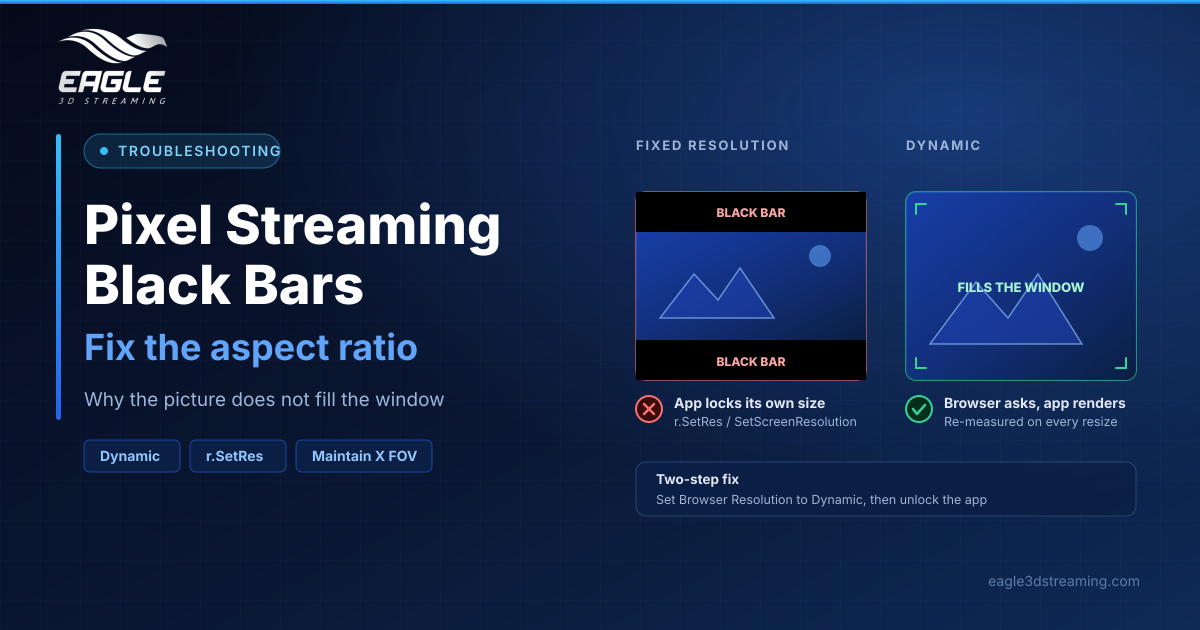
Pixel streaming black bars are the empty strips that sit above, below or beside your stream when the picture does not fill the window. They look like a broken connection to a client. They are not. In almost every case, one setting inside your Unreal project causes them.
What you are actually looking at
The stream page has two layers: a black background filling the window, and the video drawn on top. When the video's shape differs from the window's shape, the video scales down to fit and the uncovered background shows through. Make that background white and the bars would be white. (Black bars)
The shape mismatch decides where they land:
| Picture | Window | Result |
|---|---|---|
| Same shape | Matching | No bars |
| Wider than the window | 1000 × 900 | Bars above and below |
| Narrower than the window | 1900 × 800 | Bars left and right |
How the stream normally avoids them
Browser Resolution has two settings, and Dynamic is the default. On Dynamic the page measures the area the video occupies, asks the Unreal app to render at exactly that size, and repeats the measurement whenever someone resizes a window or rotates a phone. A 1600 × 900 window gets a 1600 × 900 picture, so no background is left showing. (Resolution)
Re-measuring happens at most about three times a second, which keeps resizing smooth rather than frantic.
Why only some viewers complain
Here is the catch. If your app fixes its own resolution, it ignores what the browser asks for. Everyone whose window is not that exact size then sees bars, while your own monitor may happen to match and look perfect.
Four places lock a resolution:
- Project or config settings: a fixed resolution for the packaged game
- Blueprint: Set Screen Resolution followed by Apply Settings
- Blueprint: an Execute Console Command node running
r.SetRes, at start-up or on a timer - C++:
UGameUserSettings::SetScreenResolution, orr.SetRes
The two-step fix
First, open the Control Panel and set Browser Resolution to Dynamic. Second, remove the fixed-resolution setting from the Unreal project, then package and upload the new build. Searching the project for SetScreenResolution and r.SetRes finds most offenders quickly.
Afterwards, open the stream and drag the window into several different shapes. The picture should follow every time. (Black bars)
The portrait-phone variant
Sometimes the bars are gone but the right side of the scene is cut off in a tall window. That is a camera setting rather than a resolution one: the Aspect Ratio Axis Constraint defaults to Maintain Y FOV, and switching it to Maintain X FOV in Unreal fixes the crop (Resolution). Epic documents it as the enum describing how to constrain perspective viewport FOV.
When a fixed size is the right answer
Dynamic is not always what you want. Kiosks, video walls, ultrawide screens and portrait displays all have one known shape, so Custom with a fixed width and height suits them.
Two cautions come with Custom. Leaving either box empty does not apply a default, because the stream falls back to Dynamic instead. And for public links or QR codes, where you cannot know the audience, the docs recommend a fixed 1280 × 720.
Bandwidth scales with pixels, and a single stream is capped at 20 Mbps:
| Size | Recommended viewer bandwidth |
|---|---|
| 1280 × 720 | about 10 Mbps |
| 1920 × 1080 | about 15 Mbps |
| 2560 × 1440 | around 25 Mbps |
| 3840 × 2160 | 35 Mbps or more |
That cap never troubles 720p or 1080p, though it does limit 4K quality. For the difference between resolution and compression quality, read our guide to pixel streaming video quality.
FAQs
Are pixel streaming black bars a connection problem?
No. They are a shape mismatch between the picture and the window. (Black bars)
Why does my stream look fine but my client sees bars?
Your window probably matches the resolution your app locks. Theirs does not.
Does resolution drop when the connection slows?
No. Pixel count stays put while compression quality adapts, so a large picture arrives soft rather than small.
Can guests change the resolution during a meeting?
No. Guests watch at a fixed size, and only the session starter controls it.
Does a 4K laptop stream at 4K?
Not usually. Screen scaling counts in browser pixels, so a 4K laptop at 200% scaling reports 1920 wide and streams at 1920 wide.
Conclusion
Pixel streaming black bars almost always trace back to an app that insists on its own resolution. Set Browser Resolution to Dynamic, strip the fixed resolution out of the Unreal project, and keep Custom for the screens whose shape you genuinely know in advance.
Still seeing bars after both steps? Contact support with your app name and a screenshot.
Need help? support@eagle3dstreaming.com · Discord