Unreal Engine BIM Workflows: Turning Revit Models Into Streamable, Interactive 3D
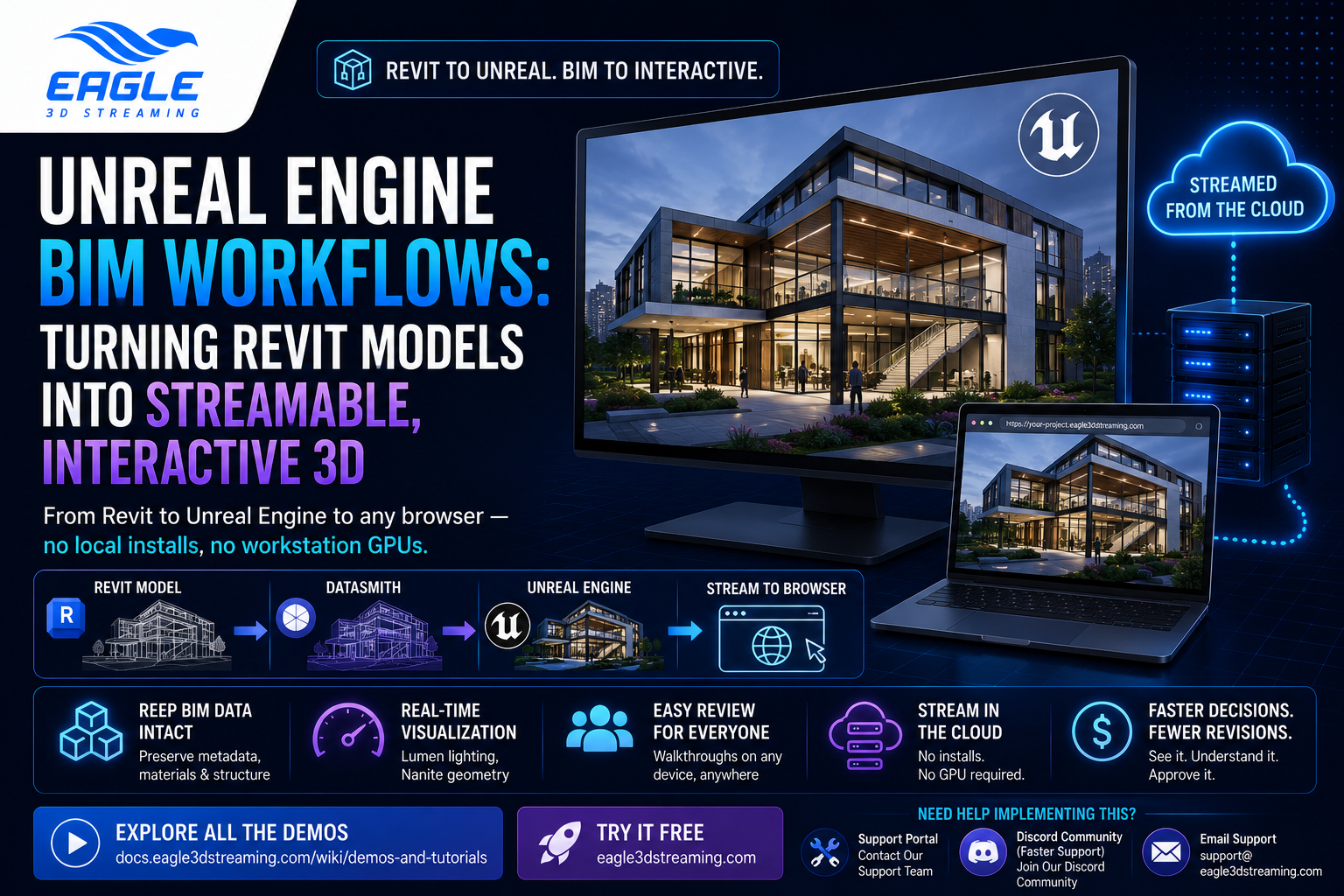
BIM software like Revit is built for technical accuracy, not for showing a client what a building actually feels like to walk through. That gap is why more AEC teams are routing their BIM data into Unreal Engine: it turns a static model into something stakeholders can explore in real time, then stream straight to a browser without anyone needing a workstation GPU. Here's how the Revit-to-Unreal pipeline actually works, where it breaks, and how to get the result in front of clients without local installs.
 MD Rafshan Tashin Eshan
July 3, 2026
6 min read
BIM software like Revit is built for technical accuracy, not for showing a client what a building actually feels like to walk through. That gap is why more AEC teams are routing their BIM data into Unreal Engine: it turns a static model into something stakeholders can explore in real time, then stream straight to a browser without anyone needing a workstation GPU. Here's how the Revit-to-Unreal pipeline actually works, where it breaks, and how to get the result in front of clients without local installs.
This is especially relevant for AEC teams coordinating across firms, time zones, and review cycles.
Why Revit Alone Isn't Built for Stakeholder Review
Revit models are dense with the metadata a contractor or engineer needs: material specs, MEP routing, structural tolerances. But that density doesn't translate into something a non-technical stakeholder can read. A 2D plan or a Revit walkthrough still asks the viewer to mentally reconstruct depth, lighting, and scale. Misread plans are a common source of late-stage rework, especially on MEP-heavy projects where clashes aren't obvious until someone's standing in the space.
Unreal Engine closes that gap by rendering the same model with real lighting, real materials, and a first-person or orbit camera the client can actually control.
What Unreal Engine Adds to a BIM Model
A few UE5 features specifically address the problems static BIM exports run into:
- Nanite virtualized geometry lets you bring in highly detailed models without manually building LODs for every asset, which matters for full-building or campus-scale imports.
- Lumen handles real-time global illumination, so you can change a sun angle or swap a light fixture and see the result immediately instead of waiting on a bake.
- Datasmith is Epic's plugin for importing CAD/BIM formats (Revit, IFC, and others) directly into UE, carrying over geometry, materials, and metadata rather than a flattened export.
None of this replaces Revit. The BIM model stays the system of record; Unreal is the visualization layer on top of it.
The Revit-to-Unreal Workflow
1. Prep the Revit model
Before exporting anything, model organization determines how painful the import will be:
- Use worksets to separate structural, architectural, and MEP elements so you can manage them independently once they're in UE.
- Name materials specifically (not "Concrete" — something like "Concrete_Precast_GreyFinish") so Datasmith doesn't merge unrelated surfaces under one generic material in Unreal.
2. Choose your import path: Datasmith direct, or IFC
You've got two main routes into Unreal:
- Datasmith direct export from Revit, using Epic's Datasmith Exporter plugin for Revit. This is generally the more reliable path for retaining metadata and materials, and it supports Datasmith Direct Link for pushing updates back into the same UE scene as the Revit model changes.
- IFC export, useful when Revit isn't the source tool or you need a vendor-neutral format. IFC exports are more prone to dropped metadata and geometry issues than a direct Datasmith export, so plan on a validation pass (tools like Solibri or IfcOpenShell can flag clashes and malformed geometry before you import).
3. Import and fix up in Unreal
After import, expect some cleanup regardless of path:
- Check import scale — Revit works in feet or meters, UE works in centimeters, and unit mismatches are one of the most common "why is my building tiny" issues.
- Use UE's Geometry Script tools to repair non-manifold edges or stray geometry that didn't survive the conversion cleanly.
- Reassign any materials that came through as a default/missing material rather than the Revit original.
4. Light and optimize for the model's actual scale
- Set up Sky Atmosphere if you want geolocation-accurate sun position for a specific site and time of day.
- For large models, Level Streaming (splitting a tall building into sublevels by floor range, for example) keeps memory usage manageable instead of loading the whole structure at once.
- Texture compression and reusing shared materials across repeated elements (window frames, structural members) cut GPU memory load on bigger projects.
Where This Pipeline Actually Breaks
Worth being upfront about the rough edges, since most of the writeups on this topic skip them:
| Issue | What causes it | What helps |
| Missing or generic materials after import | Generic Revit material names, or IFC's metadata stripping | Rename materials before export; prefer Datasmith over IFC when possible |
| Misaligned or floating geometry | Conversion artifacts, especially common on IFC exports | Run Geometry Script repair tools; validate with Solibri/IfcOpenShell pre-export |
| Scene doesn't update with Revit changes | One-time export instead of a linked workflow | Use Datasmith Direct Link for incremental re-imports |
| Frame rate drops on big models | No level streaming, uncompressed textures, too many unique materials | Split into sublevels, compress textures, pool repeated materials |
Where Eagle 3D Streaming Fits
Once a BIM model is in Unreal and running well, the next problem is distribution: not every reviewer has a GPU workstation or wants to install anything. Eagle 3D Streaming runs your packaged UE5 application on cloud GPU infrastructure and streams it to a browser, so a client can walk through the same Revit-derived environment from a laptop or tablet with nothing installed locally. That's particularly useful for AEC review cycles where stakeholders are scattered across firms, time zones, and devices, and asking everyone to run the build locally isn't realistic. It's the same accessibility problem VDC teams run into with construction visualization more broadly. You can see current plans on the pricing page, or check the documentation for upload and config steps.
FAQ
Does Unreal Engine replace Revit for BIM work? No. Revit (or your BIM authoring tool) stays the source of record for technical data. Unreal Engine is the visualization layer you bring the model into for review and walkthroughs.
What's the best way to get a Revit model into Unreal Engine? Datasmith's direct export from Revit is generally the most reliable route, since it retains more material and metadata than going through IFC. Use IFC when Revit isn't your source application or you need a vendor-neutral handoff.
Why does my model look tiny or oddly scaled after import? Almost always a units mismatch — Revit uses feet or meters, Unreal uses centimeters. Check the import scale setting before troubleshooting anything else.
Can large BIM models run smoothly in real time? Yes, with the right setup. Level streaming, Nanite for dense geometry, and compressed/pooled textures are the main levers for keeping frame rate stable on bigger projects.
Does Datasmith update automatically when I change the Revit model? With Datasmith Direct Link, you can push incremental updates from Revit into the same UE scene instead of re-exporting and re-importing from scratch.
How do I show a BIM-to-Unreal walkthrough to a client without them installing anything? Package the UE application and stream it through a platform like Eagle 3D Streaming, which runs it on cloud GPU infrastructure and delivers it to any browser.
Got a Revit or IFC model you're trying to get streaming reliably? Drop into our Discord or email support@eagle3dstreaming.com and we can walk through the setup.
Share this article