High-Fidelity 3D Streaming for the Web: How to Embed Interactive Unreal Engine Experiences Without Losing Your Brand
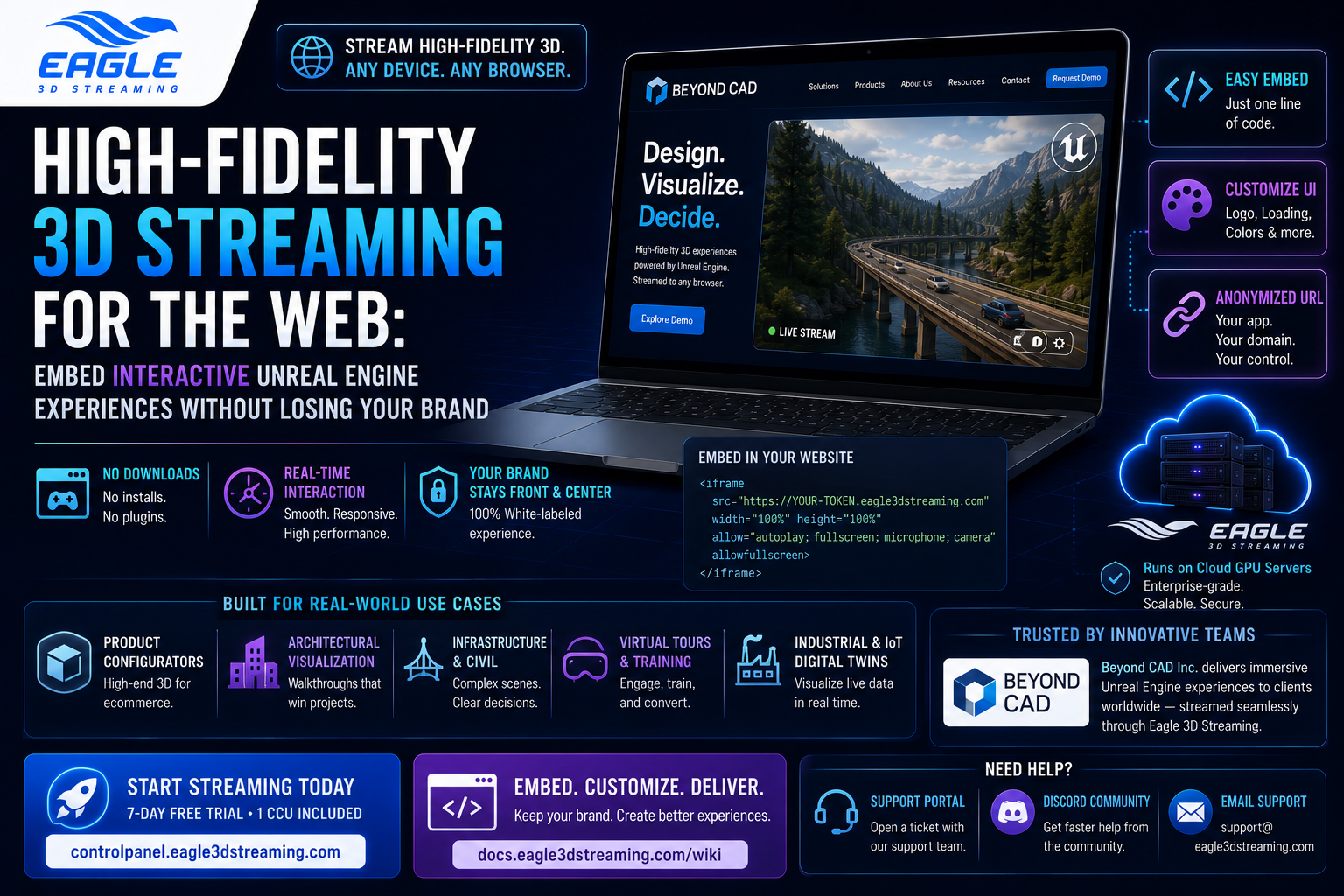
Embed high-fidelity Unreal Engine experiences directly in your website with pixel streaming — covers the buy-vs-build tradeoff, iframe integration, white-label branding, URL anonymization, and how Beyond CAD ships interactive 3D tools on their own domain.
 MD Rafshan Tashin Eshan
July 3, 2026
7 min read
If you're building interactive 3D experiences in Unreal Engine — product configurators, infrastructure visualizations, CAD-based demos — you eventually hit the same wall: your UE app looks incredible on your own machine and falls completely flat in the hands of a client. They don't have the GPU. IT blocks the executable. The download is too large to bother. And if you fall back to a third-party streaming link, your brand disappears the moment they click it.
This post covers how high-fidelity 3D streaming over the web actually works, what the real tradeoffs are between building your own infrastructure versus using a managed platform, and how to embed a pixel-streamed experience directly into your own website so the end user never leaves your domain.
What "high-fidelity 3D streaming" actually means
Pixel streaming runs your packaged Unreal Engine application on a cloud GPU server and sends the rendered video output to a browser in real time, with the user's mouse and keyboard input traveling back the other direction. The user's device renders nothing heavier than video — no local GPU required, no download, no install.
The "high-fidelity" distinction matters because there are lighter-weight alternatives for simpler use cases: glTF viewers, WebGL scenes, Unity WebAssembly builds. Those are fine for relatively simple geometry. For a full Unreal Engine 5 scene with Lumen lighting, Nanite geometry, or a photorealistic environment running at 60fps, pixel streaming is currently the only viable delivery method to a browser without specialized hardware on the user's end.
Buy vs. build: why most teams stop self-hosting
Epic Games ships an open-source pixel streaming infrastructure (PixelStreamingInfrastructure on GitHub) that you can self-host. Teams that go this route quickly discover that the technology works, but running it at any scale creates a separate full-time problem: GPU instance provisioning, cold-start latency, queue management when multiple users arrive simultaneously, WebRTC signaling servers, and the ongoing maintenance cost of keeping it current as UE versions change.
The buy-vs-build calculus for most product visualization teams and development studios looks like this:
| Factor | Self-hosted | Managed (E3DS) |
| GPU infrastructure | You provision and pay per instance | Included, scales automatically |
| Concurrent user queue | You build it | Handled |
| UE version support | You test and maintain | Updated by the platform |
| White-label delivery | You build it | Built-in via iframe and URL anonymization |
| Time to first stream | Days to weeks | Under an hour |
The self-hosted route makes sense when you have specific compliance or data-residency requirements that prevent cloud infrastructure, or when you're large enough that the engineering investment pays off at scale. For everyone else, the operational overhead generally exceeds the cost of a managed platform.
Embedding a stream in your own website
The iframe integration is what separates a managed pixel streaming platform from a simple link-sharing tool. Instead of sending clients to a URL on someone else's domain, you embed the stream directly inside a page on your own website with a single <iframe> tag. The stream loads within your site's navigation, header, and branding. To the user, it looks like your product — because it is.
The iframe embedding guide covers the full implementation, including two-way communication between your webpage and the running Unreal app (so your site's UI can trigger events inside the stream, and the UE app can pass data back out to the page). The code is standard JavaScript and works with any framework — React, Angular, Vue, or plain HTML.
Two supporting features make the embed genuinely white-labeled rather than just technically embedded:
UI customization. The streaming interface — loading screen, play button, title bar, logo — can all be set to match your brand through the control panel, with no code required. The UI customization guide walks through each element. This means a user who opens the iframe sees your logo, your loading screen, and your color scheme — not E3DS's.
URL anonymization. By default, a streaming link includes your E3DS username and app name in the URL path. Anonymizing the URL replaces that with an opaque token string, so even if a user inspects the iframe source, they see a generic hash rather than the platform provider. The URL anonymization guide covers the one-click config change that enables this.
The Beyond CAD case: a working example
Beyond CAD Inc. builds Unreal Engine tools for transportation planning — products like Beyond Typicals, which helps engineers make roadway design decisions faster, and Civil Engine, used for detailed finished designs and public engagement. Their core problem was delivery: clients at transportation agencies and civil engineering firms couldn't run the applications locally, and sharing generic streaming links broke the brand continuity they'd built.
They moved both products onto E3DS's platform, embedded the streams via iframe into their own website, and applied custom branding through the control panel. The result was that clients accessed Beyond CAD's tools from Beyond CAD's website, with Beyond CAD's branding throughout — the underlying streaming infrastructure was invisible. From a business standpoint, this meant no redirects breaking the user journey, no IT barriers from executable downloads, and trial conversions that weren't blocked by a 45-minute setup process.
The approach applies to any team shipping high-fidelity 3D: product configurators for ecommerce, architectural walkthroughs for AEC clients, interactive product demos for enterprise sales, CAD visualizations for engineering review.
Setting up: what the process looks like
For a new app, the path from packaged build to embedded stream is:
- Package your Unreal Engine project with the Pixel Streaming plugin enabled (Shipping mode recommended for client-facing builds).
- Upload the package (Zip, RAR, or 7Z) to the E3DS control panel.
- Create a streaming link and configure a streaming config — resolution, CCU count, branding settings, URL anonymization.
- Copy the iframe embed code from the control panel and paste it into your website's HTML.
From that point, the stream is live on your domain. Updates to the app don't require changes to your website — you upload a new build and the iframe continues to point to the same config.
FAQ
What's the difference between a pixel streaming link and an embedded iframe stream? A standalone streaming link takes users to a URL hosted on E3DS's domain. An iframe embed renders the same stream inside a page on your own website. Same underlying technology, different delivery and branding outcome.
Can I use this without coding knowledge? The basic embed (copy the iframe tag, paste into your page) requires minimal HTML familiarity. The two-way communication between your webpage and the UE app — triggering events, passing data — requires JavaScript. The branding and UI customization through the control panel requires no code at all.
Does it work for ecommerce product configurators? Yes. Pixel streaming is increasingly used for interactive product configurators where the 3D fidelity matters — automotive, furniture, industrial equipment. The iframe approach means the configurator lives on your product page, not on an external tool's domain.
What about traffic spikes? If a campaign drives sudden traffic, does the stream go down? E3DS manages the GPU instance pool automatically. Traffic spikes go into a queue rather than crashing the stream — users wait briefly for an available instance rather than hitting an error. For predictable high-traffic events, enterprise plans allow pre-provisioning.
How do I keep my UE app source files from being exposed to clients? The packaged build runs server-side. Clients receive a video stream and nothing else — no executable, no assets, no source files. Combining URL anonymization with the iframe embed means even the platform provider's identity can be obscured if needed.
What Unreal Engine versions does E3DS support? UE 5.0 through 5.6 as of this writing. Version support updates with platform releases — check the docs for current compatibility before packaging.
Getting started
A 7-day free trial with one CCU is available at controlpanel.eagle3dstreaming.com — no credit card required. For teams evaluating a more specific deployment (enterprise volume, custom server regions, white-label requirements), the support portal and Discord are both good places to start the conversation. For account-specific questions, reach the team at support@eagle3dstreaming.com.
Share this article